LLM + Harness = AI Agents
How to we implement agent harnesses? What is an AI agent?
In the previous post, we mentioned that an agent harness is composed of all information provided to an agent to augment the agent's ability, and that in practice, this amounts to adding MCPs, skills, prompts, and more.
However, this definition is missing the reasoning component of AI agents, and it begs the question:
How do we turn an LLM (a powerful next-token predictor) into an AI agent?
In this post, we show that an LLM is turned into a useful AI agent through the implementation of an AI agent harness. Let's see what this means in more detail below.
LLM + Harness = AI Agent
Recall that LLMs are next-token predictors that returns the next-token distribution given a set of context tokens . After a new token is generated, there is a context update function which recursively updates the context . In many systems, such as chatbots for example, the update function is simply list concatenation.
To turn LLM's into useful AI agents, we first consider the traditional POMDP / RL definition of agents. The idea is that at any time-step , an agent looks at its environment and gathers an observation . Then, using a policy , the agent uses its current observation to decide which action to take. Then, the observation-action loop continues either indefinitely or until the agent has completed it's assignment.
So to generate the answer to the user prompt, the LLM performs multiple actions until it has decided on the final answer. For almost all mainstream AI agents, the policy is implicitly restricted to a fixed state machine. For example, for the popular ReAct agent, the agent is system-prompted to repeat a sequential (Think -> Act -> Observe) loop.
Given the immense popularity of tool-calling and reasoning / self-reflection, newly released LLM models have already been fine-tuned to perform reasoning and tool-calling, so simply exposing tools to newer LLMs is often sufficient to achieve the performance of (explicitly-prompted) ReAct agents. This is why many powerful AI agents today no longer follow the original ReAct framework (e.g. LangChain no longer recommends create_react_agent). Instead, the Think and Observe phases, which were behaviors explicitly prompted in the ReAct framework, are now natively performed by the fine-tuned reasoning LLMs, resulting in a greatly simplified state machine:
Open-source implementations of AI harnesses
Let's take a look at a few (just one for now) real-world implementations of AI agents.
LangChain / LangGraph (create_agent)
The main create_agent function in LangChain uses LangGraph under the hood, which is a programming library that defines AI-augmented workflows as state-based directed graphs. A global agent state is initialized at the starting node, and the agent state is iteratively updated as the agent traverses the graph. Transitions happen when a certain criterion is met, and the agent is terminated only when it reaches an end state.
The main agent loop is where the LLM is programmed to decide what actions to take in order to accomplish the user prompt.
The pseudo-code below is the simplified LangGraph AI agent code used within create_agent.
def create_agent():
    graph.add_node("model")
    graph.add_node("tools")

    # Middlewares
    graph.add_node("before_agent")
    graph.add_node("before_model")
    graph.add_node("after_agent")
    graph.add_node("after_model")

    graph.add_edge(START, "before_agent")
    graph.add_edge("before_agent", "before_model")
    graph.add_edge("before_model", "model")
    graph.add_edge("model", "after_model")
    graph.add_edge("after_model", "after_agent")
    graph.add_edge("after_agent", END)

    # Each middleware can potentially go to the tool node
    graph.add_conditional_edge("tools", "before_agent")
    graph.add_conditional_edge("before_agent", "tools")

    graph.add_conditional_edge("tools", "before_model")
    graph.add_conditional_edge("before_model", "tools")

    graph.add_conditional_edge("tools", "after_model")
    graph.add_conditional_edge("after_model", "tools")

    graph.add_conditional_edge("tools", "after_agent")
    graph.add_conditional_edge("after_agent", "tools")

    # The main model also has access to tools
    graph.add_conditional_edge("tools", "model")
    graph.add_conditional_edge("model", "tools")
Middlewares for custom logic before and after the main agent loop
Middlewares are an abstraction implemented in LangChain / LangGraph that allows the user to "customize agent behavior between steps in the main agent loop". In the LangChain create_agent function, there are generally four types of middlewares, called before_agent, before_model, after_model, and after_agent. Middlwares seem to introduce another piece to the (confusing) AI agent design puzzle, but in the source code, middlewares are actually just defined as functions that are also ran before or after the main agent loop. The middleware functions can also be LLM calls themselves, which may invoke tool calls. Thus, we can think of middlewares as the pieces of code that engineer and process the inputs and outputs to the main agent loop. [Source Code]
MCPs and Agent Skills are tool abstractions
Model Context Protocol servers (MCPs) are simply agent tools that are developed and hosted by other developers. For the agent to know what tools are available, the agent can send an HTTPS query to the MCP server to get back a .md description of all the available tools. Then, when the LLM decides to call the MCP server tools with some LLM-determined parameters, the agent sends a JSON remote procedure calls (RPC) to execute the selected MCP server tool on the MCP server, and the result is sent back to the agent. MCPs are exposed to the agents using a .mcp.json configuration file.
Agent Skills are simply agent tools that are (usually) stored on the filesystem of the agent runtime computer. For the agent to know what tools are available, the agent is given the filesystem path to all the skills folders and queries each skills folder to get a .md description of all the available tools (this operation itself is a tool, called load_skills in LangChain). The tools here are often executable scripts (.sh or .py are common) that the LLM can run itself (e.g. when exposed with a bash tool). Then, when the LLM decides to which agent skills tools with some LLM-determined parameters, the agent executes the selected skill by usually calling the bash tool, and the result is sent back to the agent.
bash ./<path_to_skill_tool> --arg1 --arg2
As an example, let us examine how MCPs and Skills are loaded in the LangChain agent harness deepagents.
- MCPs (
.mcp.json) and local memory files (CLAUDE.md,AGENTS.md) are injected to the system prompt using aLocalContextMiddlewarein the deepagents implementation (source), and - Agent Skills are injected into the system prompt using a
SkillsMiddleware(source).
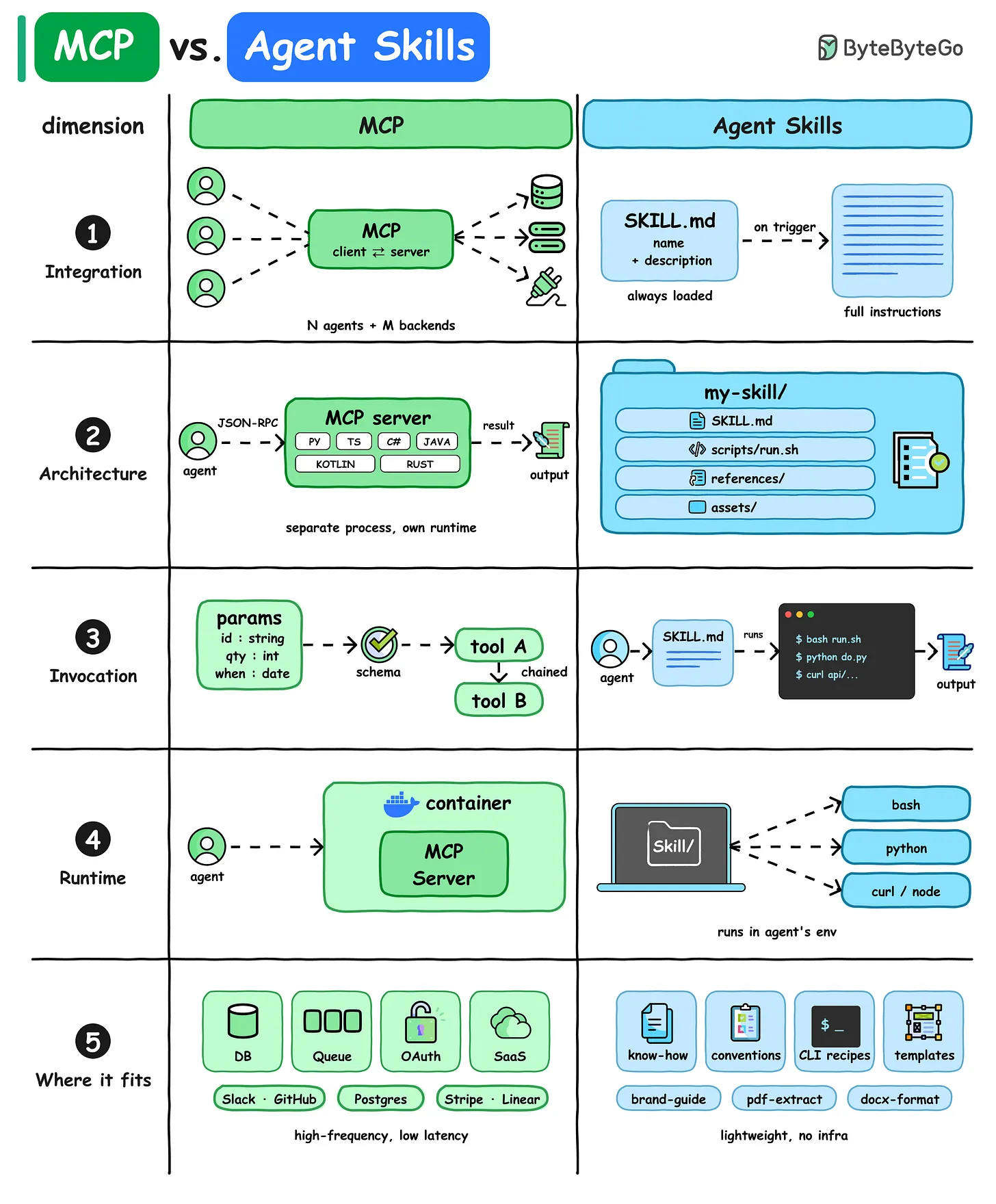 Figure 1. ByteByteGo MCP vs Skills Diagram [1]
Conclusion
In this post, we introduced the practical aspects of an AI agent harness, starting with an introduction of the main agent loop and all the engineering around prompting an LLM to behave as a state-machine, execute tools, and ultimately transform from a LLM to a useful AI agent. We also did a deep-dive on one of the most popular agent frameworks, LangChain, to see how real-world harnesses are implemented so that AI agents can remember (memories like CLAUDE.md), learn do interact with external software systems through MCPs, and perform customized behaviors through Agent Skills.
All the above is just the very beginning though! For a production-level harness, there are problems of authorization (running rm with the bash tool seems dangerous), human feedback (requesting permission to execute tools or additional information from the user), spawning and orchestrating subagents, context management, cost optimizations (caching tokens can be 10x cheaper!), and much much more.
Nevertheless, I hope you found this post helpful. Please reach out if you have any thoughts or questions!